Available since July 2026
Ultra-Long-Form YouTube Script Engine
Generate structured YouTube scripts of 15,000 words or more using your own Claude API key.
The engine writes the script section by section, carries context forward between chapters, and helps reduce the repetition and narrative drift that often appear in very long AI-generated scripts.
The problem it solves
Generating a short script in one response is relatively simple. Generating a coherent 15,000-word script is not. As the script gets longer, the model may repeat earlier points, forget unresolved ideas, change its pacing, or weaken the narrative in later chapters.
The Script Engine avoids relying on one enormous generation. It creates a detailed structure first, writes the script section by section, and carries a running summary forward so each new chapter knows what has already been established.
Who it is for
This product is built for creators producing long-form narration videos such as:
- Sleep documentaries
- History documentaries
- Science and space videos
- Educational explainers
- Long-form faceless YouTube videos
How it works
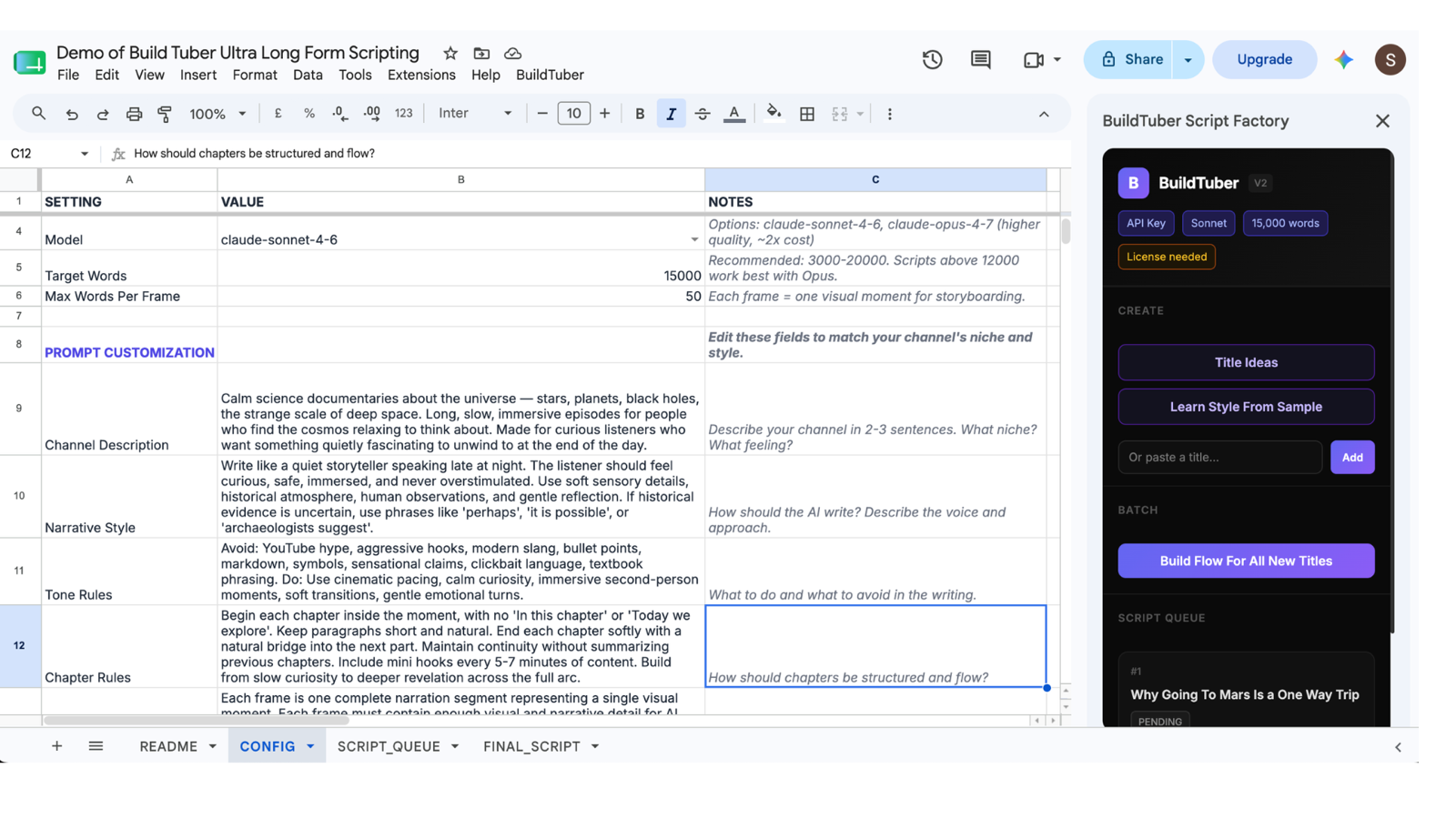
The product runs inside Google Sheets with a custom Apps Script sidebar. Add your Claude API key and BuildTuber license key in the CONFIG tab, then enter one or more video titles through the sidebar or the SCRIPT_QUEUE tab.
For each title, the engine:
- Creates the narrative structure
- Builds the chapter flow
- Writes the script section by section
- Carries a running summary between sections
- Saves the completed script in the Sheet
- Creates a separate Google Doc for the finished script
The prompts, writing rules, and generation settings remain editable inside your copy of the Sheet.
Delivered as: A Google Sheet you copy to your own Google account, unlocked with a licence key.
What you get
- The complete Google Sheets Script Engine
- Setup instructions inside the Sheet
- A custom sidebar for creating and managing scripts
- Editable prompts for niche, tone, narrative style, chapter structure, and writing rules
- A separate Google Doc for every completed script
- The option to learn a writing style from a sample script
- Hook suggestions and a YouTube video description for completed scripts
What it does not include
- Claude API credit. You pay Anthropic directly, at their rates.
- Images, voiceover, editing or rendering. This product writes scripts and stops there.
What goes in, what comes out
You supply
- A Google account, since the product is a Google Sheet
- Your own Claude API key from console.anthropic.com
- BuildTuber license key supplied after purchase
- One or more video titles
- A short description of your channel or niche
It produces
- A detailed narrative structure for each title
- A chapter-by-chapter writing plan
- A script of 15,000 words or more, depending on your selected target
- A separate Google Doc containing the completed script
- A FINAL_SCRIPT tab with chapter numbers, titles, frame numbers, and script lines
What it costs to run
The product is a one-time purchase. Script generation is billed separately by Anthropic through your own Claude API account.
In my current workflow, a 15,000-word script costs approximately $0.30 for the Sonnet 4.6 model in direct Claude API usage.
Your actual cost will depend on:
- The Claude model selected
- Script length
- Prompt and research context
- Current Anthropic pricing
Billed directly to you by Anthropic (Claude). Nothing is added on top.
Setting it up
- Go to console.anthropic.com
- Create an account and add $5 credit (enough for 10+ scripts)
- Go to API Keys, then Create Key
- Copy the key and paste it into the CONFIG tab, with your licence key
Your API key, your account, your bill
The Script Engine runs through your own Anthropic account and Claude API key. Anthropic bills you directly for the model usage at its current API rates. BuildTuber does not resell the API access or add a usage markup.
Because there is no recurring BuildTuber subscription, you only incur API costs when you generate scripts.
The prompts and writing settings remain inside the CONFIG tab of your own Google Sheet. You can read them, edit them, and adapt the workflow to your channel at any time.
Frequently asked questions
Is this a subscription?
No. The Script Engine is a one-time purchase, and the Google Sheet is yours to keep. There is no recurring BuildTuber fee. You will still pay Anthropic separately for the Claude API usage generated through your own account.
Do I need my own API key?
Yes. You need an Anthropic Console account, a Claude API key, and sufficient API credit to generate scripts. You paste the key into the CONFIG tab of your own copy of the Sheet. BuildTuber does not provide, store, or manage your Anthropic account. A small amount of credit is enough to begin testing. The number of scripts it produces will depend on the selected model, script length, retries, and current Anthropic pricing.
Do I need to know how to code?
No coding knowledge is required for normal use. After setup, you enter titles, adjust the writing settings, and run the generation process through the sidebar. The underlying Apps Script handles the API calls, chapter sequence, running context, and file creation. You should still be comfortable following setup instructions, adding an API key,
Can I change how it writes?
Yes, and that is the point of the CONFIG tab. Channel description, target word count, model selection, narrative style, tone rules, chapter rules and frame rules are all editable fields. The Sheet includes working defaults, but you can adapt them to different niches, formats, and writing styles.
How is this different from the free guides?
The free guides explain the method: how the workflow is structured, how the prompts connect, and how to build a basic version yourself. The paid Script Engine is the finished implementation. The Sheet, sidebar, prompts, queues, context system, output structure, and supporting features are already assembled and tested. You are paying to skip much of the setup, coding, and debugging time.
Which model does it use?
The model can be selected inside the CONFIG tab. It currently provides Sonnet & Opus. You can choose any model based on the quality, speed, and cost you prefer.
Can it generate more than one script at a time?
Yes. You can add multiple titles to the script queue and process them through the sidebar. Each script is generated through its own structured flow and saved separately. Actual batch size and completion time depend on Anthropic rate limits, model speed, script length, and available API credit.
Does it research and fact-check the script?
No. The engine writes from the title, prompts, instructions, and research material you provide. It does not guarantee that every claim is accurate or properly sourced. You should review important facts, quotations, dates, and scientific or historical claims before publishing.
Does this generate the finished YouTube video?
No. This product stops at the script. It does not generate the voiceover, images, stock footage, thumbnail, edit, or rendered video. Those stages require separate tools or workflows.
One payment, yours to keep
No subscription. You run it on your own key and pay the provider directly for what you use.
Get the build guides as they go out.
One email when a new guide ships. The full method, not a teaser. Unsubscribe whenever.