My 90-minute sleep documentaries cost under $1
You do not need an expensive all-in-one AI video tool to make an ultra long-form sleep documentary for YouTube. I use the Claude API for the script and CapCut for the voiceover, stock footage and assembly. The direct production cost stays under a dollar because the script is billed by usage on my own key, and the one subscription I pay for gets spread across everything I publish that month.
What does the workflow actually look like?
Topic, then chapter outline, then a section-by-section script, then voiceover and footage, then review, then export.
The tools matter less than the writing. A two-hour video with beautiful visuals still loses people fast when the script repeats itself, wanders, or forgets what it said twenty minutes ago. On my own channels, 90-minute documentaries have held average view durations above 25 minutes, and that is mostly down to structure and pacing rather than anything visual.
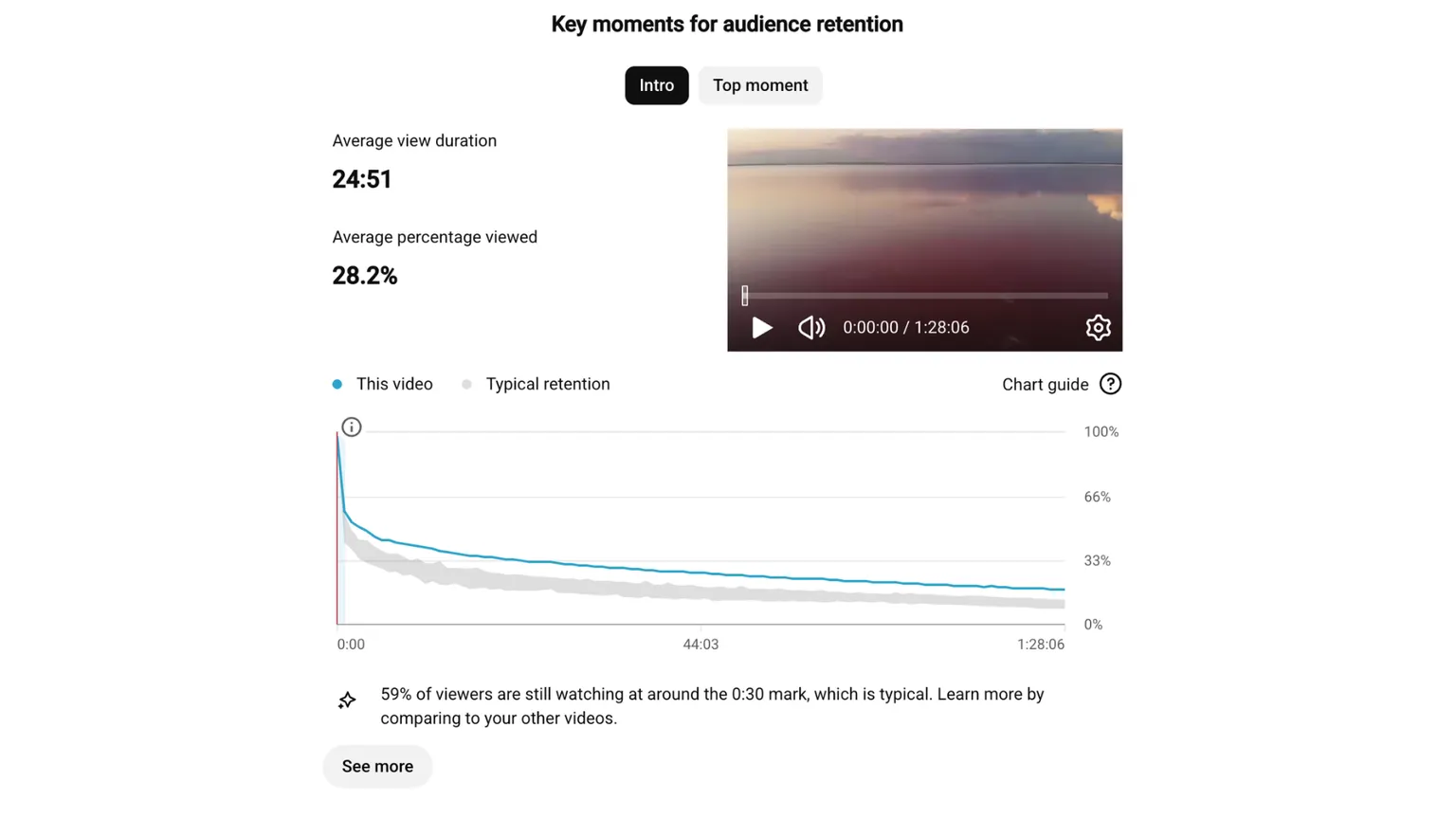
So the script and topic research should get the bulk of the effort, long before the video editor is open.
Why not generate the whole script in one prompt?
My first attempt was one huge prompt asking Claude for 15,000 words. It looks fast and efficient but it mostly fails, in a way you learn to spot: explanations get repeated, the pacing goes uneven, later chapters contradict earlier ones, threads get dropped, and a strong opening slides into a weaker second half.
The writing itself reads fine. The documentary still loses its direction. In ultra long-form video that drift hurts more than it would in an article, because nobody is judging one paragraph in isolation. They are following a single story for over an hour.
The fix was not a bigger prompt. It was a different production structure.
How does the section-by-section workflow work?
Instead of asking for the documentary in one call, the script engine builds it one section at a time.
First, build the full chapter structure. The opening generation produces a narrative plan for the whole documentary: the central question, the promise you are making to the viewer, how one chapter leads into the next, what each chapter is for, what gets held back, where the revelations land, and how the ending pays off the opening. That gives the model a fixed destination before it writes a single word. A weak outline does not get rescued by generating more words. The outline is where the documentary’s logic actually gets decided. And if you have enough knowledge in the documentary’s subject domain, its best you write your own structure instead of relying on AI.
Then generate one section at a time. Each API call to Claude gets the title, the narrative plan, the job of the current section, a target word count, any research notes, style and pacing instructions, and a summary of everything written so far. The model writes that section and nothing else. It never regenerates the whole documentary.
Then carry the story forward with a running summary. After each section, the system writes or updates a short summary and feeds it back in before the next one. Section eight knows what happened in sections one through seven without pasting the entire script into the context window every single time. That running context is what keeps the chronology, the established facts, the open questions, the tone and the pacing intact, and it is what stops a later chapter re-explaining something the viewer already heard.
I still read the finished script for repetition, claims I cannot support, weak transitions and sections that feel bolted on. The structure gives the model a memory. It may not give it judgement.
Why use the API instead of the Claude browser chat?
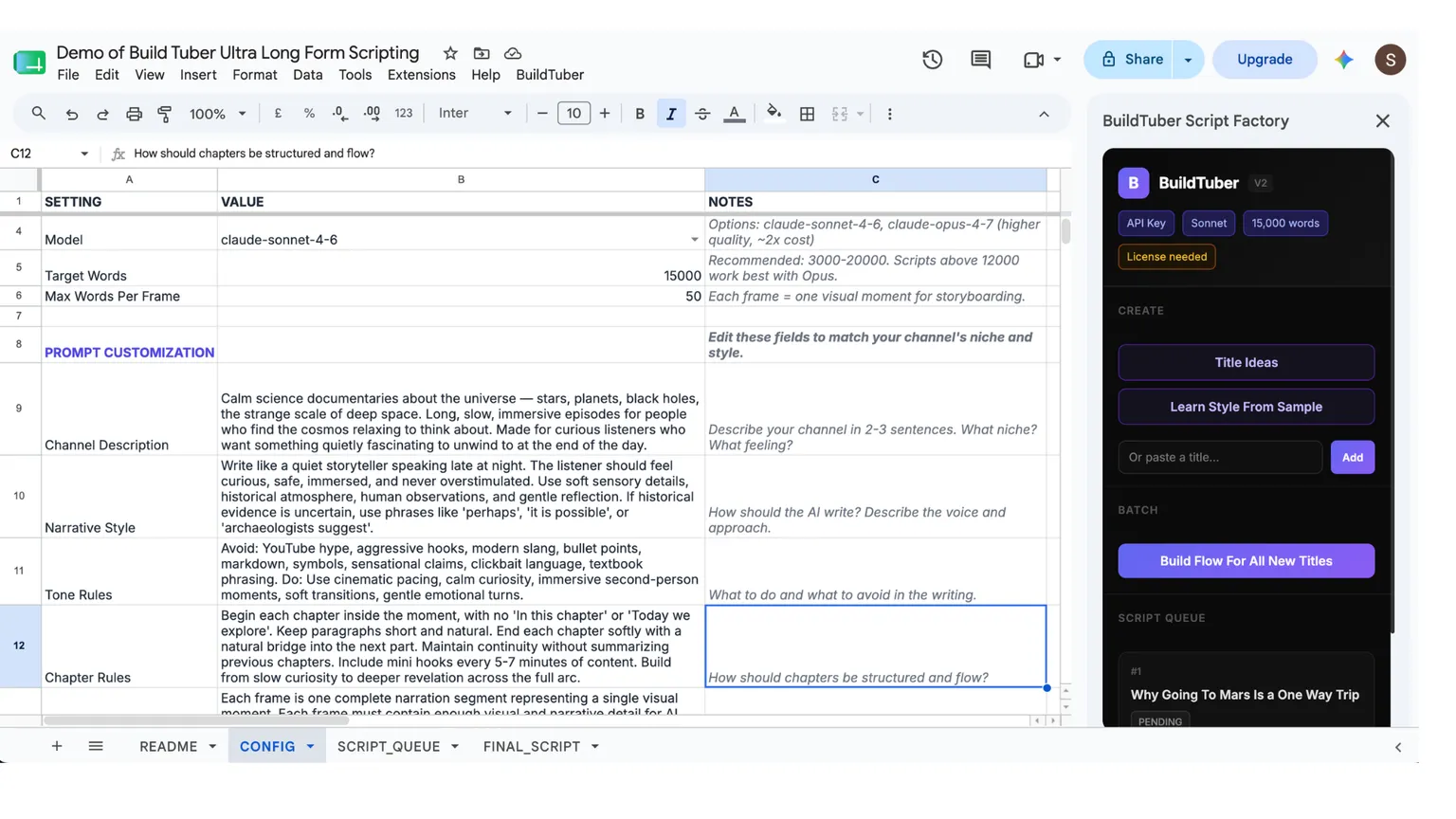
I run the whole thing inside a Google Sheet wired to the Claude API through Apps Script. The Sheet holds the chapter order, the prompt construction, the running summaries, section status, word counts, error logs and the final script.
The API reaches the same model family on usage-based pricing, and it is built for software to call rather than for someone typing into a chat window. It is not an unlimited tap either. API accounts still have rate limits and spend limits.
It also means I hold the key. I create and fund my own Anthropic account, put my key into my own workflow, and pay the provider directly for what I use. That is what BYOK means in practice. It is the difference between choosing which model runs, how prompts get built, how retries are handled and where the output lives, and just accepting whatever a vendor decides this quarter. The longer version of that argument is in what “own your stack” actually means.
You do not need to be a developer to build a basic version of this. A coding model will write most of the Apps Script from a plain-English description. The hard part was never the first block of code. It is deciding what the system should remember, what each stage hands to the next, and what happens when a generation fails.
What does a 15,000-word script actually cost?
About $0.30 using the Sonnet 4.6 in direct API usage, in my current setup.
That is one measured result, not a price list. The thing that moves it most is simply how long the script is. You pay for the words going in and the words coming out, so a 15,000-word documentary costs more than a 6,000-word one. After that it comes down to how many times you regenerate a section you were not happy with, and which model you pick. A cheaper, faster model costs a fraction of a top-tier one and is usually fine for straight narration.
So your number will not be my number. That is what the cost calculator is for. Put in your own script length and model and you get a figure you can plan against, instead of inheriting mine.
Two parts of this cost nothing at all. You can work out the chapter order and the narrative flow yourself, on paper, before you generate a single word. And you should. The model writes better sections when someone has already decided where the story is going.
The one place worth spending real time is the topic, and that is your time rather than anything you pay the API for. A well-chosen subject with an actual story in it will beat a cheap script about something nobody was looking for. No model switch fixes a topic nobody wanted.
How do you turn the script into a 90-minute video?
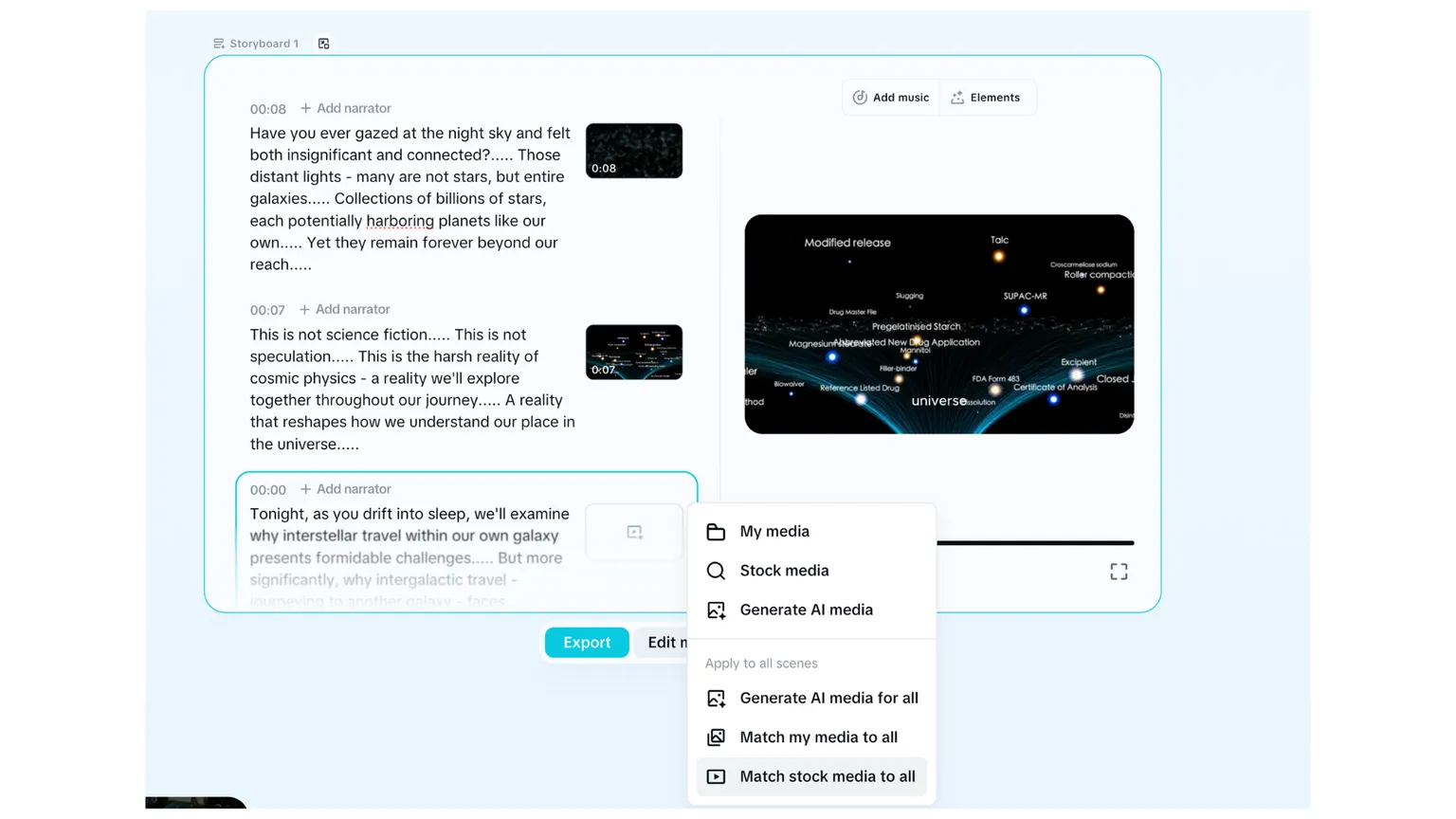
Once the script is approved, CapCut’s script-to-video workflow handles most of the first assembly: generating the voiceover, breaking the script into scenes, matching stock footage to the narration, building an initial timeline and producing a rough cut to review.
That CapCut link is an affiliate link. I get a commission if you subscribe through it, and it does not change what you pay.
The voice is not a minor setting. For sleep content it is most of the product. I want calm delivery, natural sentence endings, steady volume, clear pronunciation, no big emotional swings, and a pace that is slow without going lifeless. The technically best voice is not automatically the right one, so I generate a short sample before committing to a full documentary.
Split long scripts into parts. CapCut puts input limits on some of its script-to-video tools, and those limits differ between features, platforms and versions. Rather than lean on one huge import, I split the documentary into parts, generate each one separately, export them, and combine afterwards. It makes failure cheap too. A bad scene in part three does not mean rebuilding ninety minutes.
Check what the footage is actually showing. The first cut is not publish-ready. Broad concepts like ice age, ancient city, ocean or archaeology usually get matched well enough, but some clips come back too literal, geographically wrong, historically wrong, or just reused too many times. On a new channel I would not spend hours swapping out every imperfect shot. Fix what is misleading, distracting or obviously recycled, and leave the rest. Better archival footage, licensed stock, maps and custom motion graphics are worth paying for once the channel has proven the format works, not before.
Does this protect a channel from demonetization?
Since the videos are not built entirely from AI generated images assets and mixing relevant stock footage with selective AI visuals makes the final documentary feel more deliberately produced and less like a fully automated slideshow. Its also the safest defense against the “Reused/Inauthentic Content” flags that destroy fully automated channels.
YouTube’s monetization policy turns on whether content is original and authentic rather than repetitive or mass-produced. In July 2025 the platform renamed its “repetitious content” policy to “inauthentic content” to make that clearer. It did not change what was already ineligible, it just described it better. YouTube also asks for disclosure when realistic synthetic or altered content shows real people, events or places doing things that did not happen.
So the safer route is not just more variety in your B-roll. It is editorial contribution you can point at: original topic selection, real research, a story that holds together, claims a human checked, visuals that fit, original title and thumbnails, and real variation between videos. AI can do the production work. It cannot supply the judgement that makes one documentary different from the next.
How does the total stay under $1?
Two numbers, and one of them is allocated rather than direct.
A complete 15,000 words script usually costs me around $0.30 through the Claude API. CapCut costs about $20 per month and supports unlimited exports. At a volume of 30 to 40 documentaries per month, the direct software and API cost works out to roughly $1 per finished video.
That number does not include research, thumbnails, subscriptions beyond CapCut, or the value of my time. It is only the incremental production cost.
Many AI video tools charge $40 to $50 per month while using the same underlying models and adding a markup for convenience. Building the loop once gave me more control and removed another recurring subscription.
Why does low production cost matter?
The real advantage is not saving a few cents. It is being able to test more ideas without every upload becoming an expensive decision. Because it decides how long you can keep publishing before the channel has to start working.
A new channel can need months of uploads before it produces meaningful traffic or revenue. Expensive monthly tooling makes people quit before they have gathered enough evidence to know whether the niche or the format was ever viable. A cheap workflow lets me test more topics, publish consistently, drop a weak format without feeling the sunk cost, run more than one channel, and keep going while revenue is still near zero.
The point is not to flood YouTube with low-effort videos. It is to make experimenting cheap enough that I can keep getting better instead of running out of money first.
The same workflow can work for history, science, philosophy, mythology, meditation, biographies, or almost any calm long-form format where the script matters more than rapid editing.
The complete workflow
- Choose a documentary topic.
- Build a detailed chapter and narrative plan.
- Generate the script one section at a time.
- Carry a running summary into each new section.
- Review the full script for accuracy, pacing and repetition.
- Split the script into manageable CapCut inputs.
- Generate the voiceover and an initial footage timeline.
- Replace footage that is wrong or repetitive.
- Merge the exported parts.
- Watch the complete render before publishing.
A structured outline, a section-by-section loop, running context, a key you own, and a separate tool for assembly. None of it needs to stay secret.
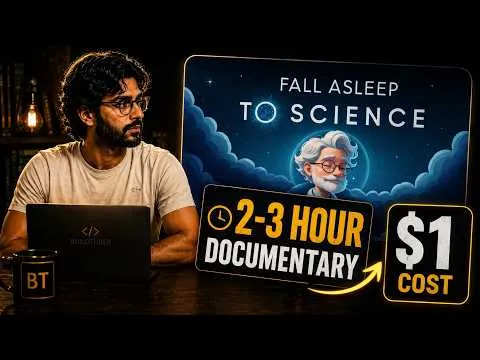
I have also explained the entire workflow on my channel showing the exact way to build this. Check it below
Building it yourself costs a weekend of setup and debugging. If you would rather not spend it, the Long-Form Script Engine is this workflow already wired into a Google Sheet, as a one-time purchase that runs on your own API key. The method is the same either way. One costs you time, the other costs money.
Frequently asked questions
How many words does a 90-minute sleep documentary need?
Mine usually land around 15,000 words, but test your chosen voice on a sample before you fix a target. It comes down to narration speed. A slow documentary voice covers fewer words per minute than a fast explainer, so the same script runs longer.
Can Claude write a 15,000-word script in one response?
It can produce a very long output, but length is not the problem. Consistency is. One enormous generation tends to repeat explanations, drift in pace and contradict earlier chapters. Generating a detailed outline first, then writing section by section with a running summary, holds the structure far better.
How much does a 15,000-word Claude script cost?
Roughly $0.30 using Sonnet 4.6 in direct API usage. Your number depends on the model, prompt size, how much context you carry forward, retries, revision passes and current provider pricing.
Does CapCut produce a finished 90-minute video automatically?
No. It gives you a useful first cut by generating the narration and matching visuals to scenes. I still split long scripts into parts, replace footage that is wrong or repetitive, merge the exports and watch the full render before publishing.
Are AI-assisted sleep documentaries eligible for YouTube monetization?
Using AI does not disqualify a channel. YouTube looks at whether content is original and authentic rather than repetitive or mass-produced. Original topic selection, real research, a human-reviewed script and deliberate visual choices matter more than whether AI was involved somewhere in production.
Why not just pay for an all-in-one AI video tool?
You can, and for a first video it is the faster route. But it can get very expensive if you are publishing volume, which you will definitely need to, especially if you are new to YouTube. On your own key you pay for what you use and since its directly from the AI provider, it gives you many opportunities to test before you run out of cash.
Sourcing
Evidence behind this guide: First-hand testing, Platform policy.
Figures last checked .
Where cost figures come from, what each evidence label means, how often pages are re-checked and what is explicitly not tested is set out on the methodology page.
Related guides
- AI Tools & Workflow7 min read
How I Make Faceless YouTube Videos: Workflow
See my complete faceless YouTube workflow from script to images, voiceover and final MP4, using Google Sheets, APIs and no manual timeline editing.
- AI Tools & Workflow5 min read
200 stickman scenes from one Google Sheet
A finished script becomes 200 scene prompts, then 200 images through Runware. What the batch measured at, and the references that hold the character.
- YouTube Growth7 min read
How to Start a Faceless YouTube Channel in 2026
After 1000+ published videos, the order I would actually follow: niche first, then ideas, packaging, script, voiceover, visuals and the edit.
Get the build guides as they go out.
One email when a new guide ships. The full method, not a teaser. Unsubscribe whenever.