200 stickman scenes from one Google Sheet
Most creators already use AI to generate stickman images. They just produce them one scene at a time: prompt, generate, download, rename, repeat. All-in-one tools sell you out of that with a monthly subscription, and technical creators build their own with Python, n8n or Claude Code.
I wanted the thing in between — a low-cost workflow any creator could run from a Google Sheet without becoming a developer first. This is what I use for my psychology and self-help channels, which produced more than 250 videos in the last year.
It is built for people who are not highly technical but still want a repeatable system, because the point of getting the cost per video down is being able to test more videos.
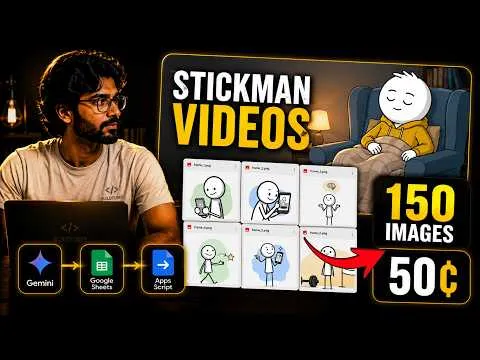
1. Start with a scene-by-scene script
The workflow begins with a finished script already divided into individual visual beats. Each row in the Sheet is one scene, with the narration in one column and space for the image prompt beside it.
You can ask Claude to split the script into visual beats and suggest where each scene should change. It still needs human review. One sentence may need a single visual, while one idea may need several.
For a 10-minute video this easily means 150 to 200 rows. Organising the script this way creates the link between narration and visuals before any image exists. Once every scene has its own row, the Sheet can process the whole video in sequence without ever losing track of which image belongs where.
2. Turn each script line into a visual prompt
Before generating anything, each script line has to become a detailed visual prompt. These run close to 100 words each, so a 200-scene video is around 20,000 words of visual direction. I use Gemini for this because it handles large batches cheaply.
Instead of pasting every line into a chat window, the Sheet sends each row through the Gemini API and writes the finished prompt into the next column.
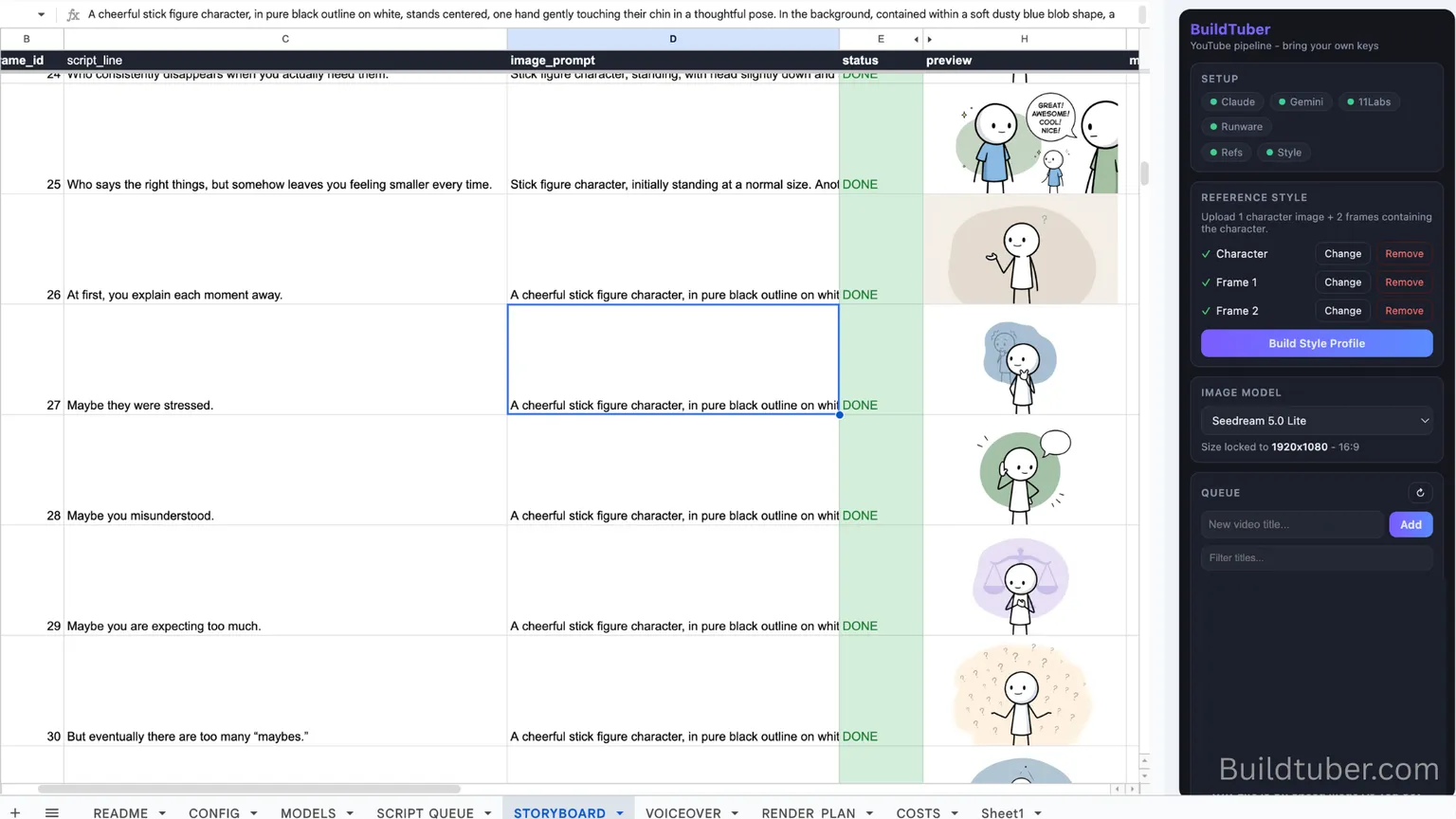
The setup sounds more technical than it is. Create a Gemini API key, then ask Claude or ChatGPT to write a Google Apps Script that reads the script from one column, sends it to Gemini, and writes the returned prompt back into the Sheet. Once that is connected, the whole batch processes without copying and pasting hundreds of lines.
The Sheet also sends Gemini a fixed visual style profile — the stickman character, colour palette, backgrounds, composition, expressions, overall look — so the prompts stay consistent across the batch. That profile is written once and reused for every video on the channel.
3. Generate the batch through an image API
You could take every prompt into Leonardo, Freepik or ChatGPT and generate there. Those tools produce good results and often give you better controls, but the workflow stays manual. Prompts have to leave the Sheet, images have to be downloaded one by one, then renamed, organised and matched back to the correct scene.
The cleaner option is connecting the Sheet directly to an image API. I use Runware because it gives access to multiple image models through one service. For each row the Sheet sends the prompt, the generation settings and the same reference images, then saves the result to Google Drive under the correct scene number.
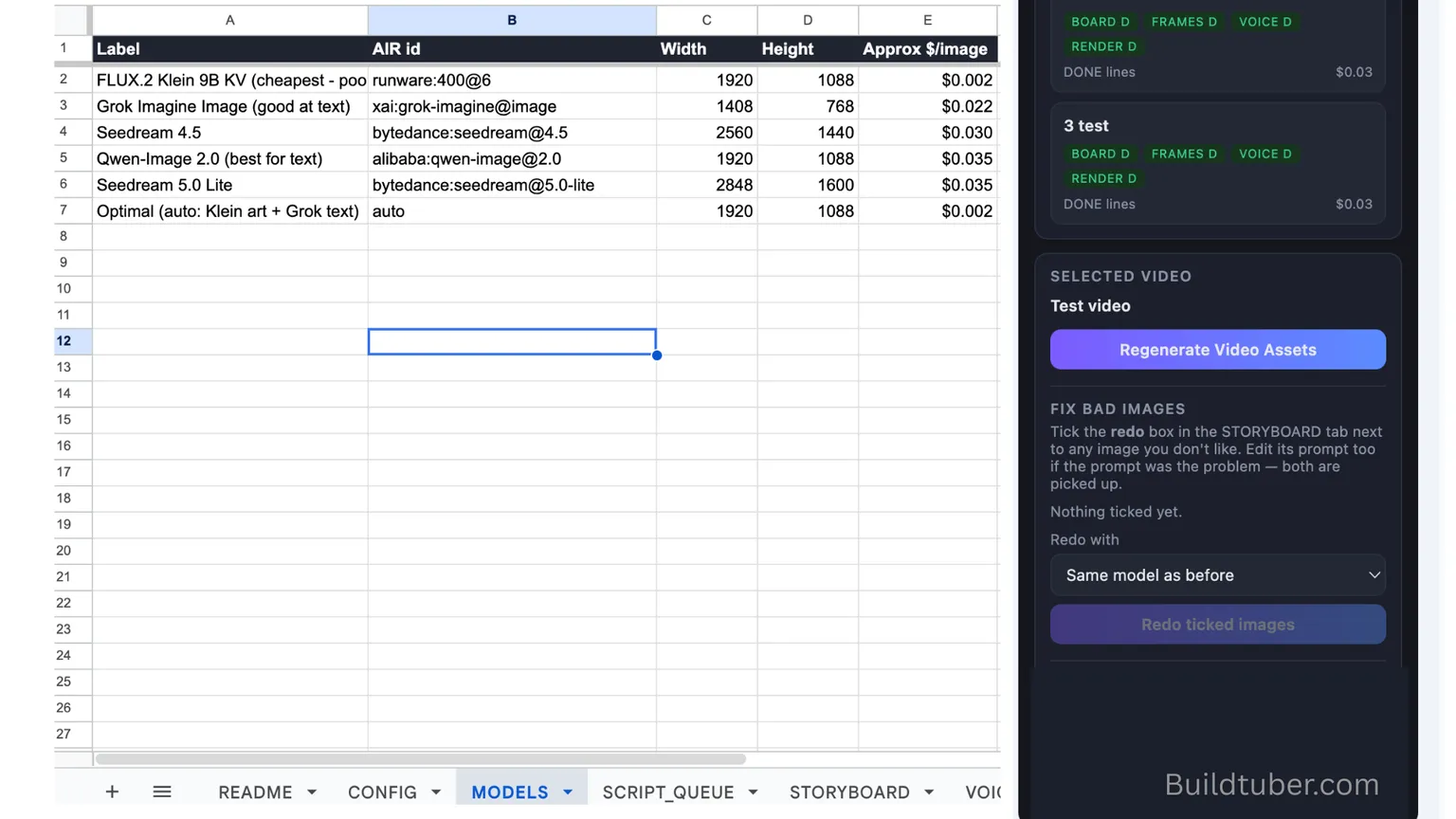
I run FLUX.2 Klein for most stickman scenes. On my Runware dashboard on 13 August 2026 it billed $0.00169 an image, returning in about two seconds. That puts a 200-scene video at $0.34 for the images.
The comparison that matters:
| Model | Per image | 200 scenes | Time per image |
|---|---|---|---|
| FLUX.2 Klein | $0.00169 | $0.34 | ~2 s |
| Grok Imagine | $0.022 | $4.40 | 15–22 s |
Both of those are measured. Seedream and Qwen sit in the same list at $0.030 and $0.035, but I have never run a batch on either, so I am not going to tell you what they cost — only what they are priced at.
Two things worth knowing before you pick:
- Failed generations are not billed. Errored calls show up on the dashboard with no charge against them, so a scene that fails and gets retried costs you once.
- Speed is a real cost. Klein at two seconds and Grok at twenty is the difference between a 200-scene batch finishing in minutes and it taking most of an hour.
The Gemini prompt-writing pass is billed separately by Google. It is small, but I have not read it off Google’s console, so there is no figure for it on this page and the $0.34 is the image half only.
The price is not really the point, though. What the API connection removes is a few hundred small repetitive actions per video.
4. Keep the character consistent
Text prompts alone are rarely enough to hold a character across 200 scenes. Even with detailed instructions, the model will change the face, the clothing, the proportions, the colours, or the whole visual style between one image and the next.
To cut that drift I send three reference images with every generation in the batch: one clear image of the main character, and two finished scenes that represent the intended style.
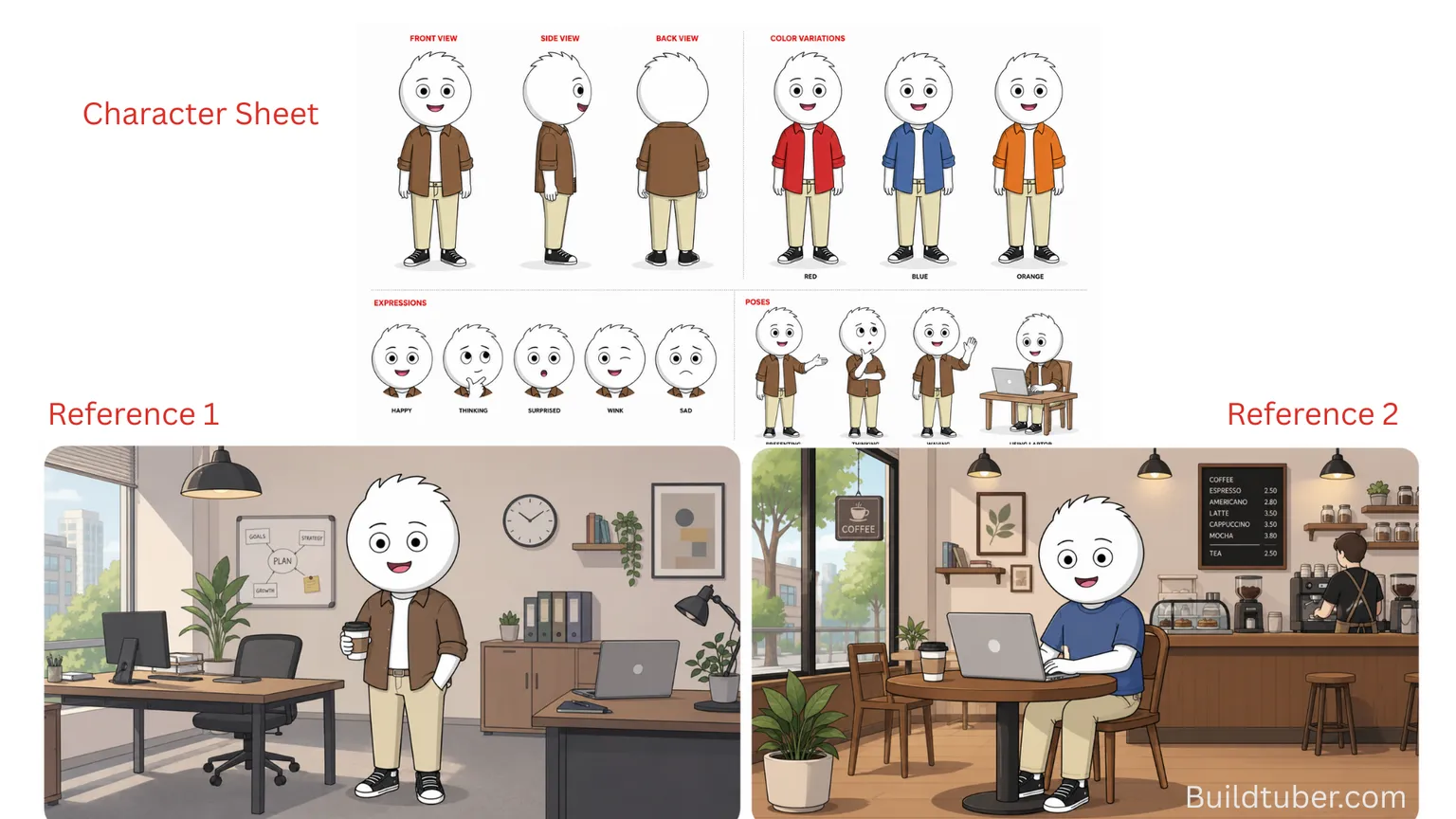
The character reference preserves appearance. The two scene references carry the colour palette, the backgrounds, the composition and the overall visual language. Sending the same three with every prompt gives the model a fixed anchor instead of letting it start fresh 200 times.
The sheet above is a sample built for this write-up, not the one behind my published videos. The structure is what matters: views, colour variants, expressions, poses, and then two real scenes showing the style in use.
5. Connect it inside the Google Sheet
The Sheet now has to coordinate Gemini, Runware and Google Drive. You do not need to write that from scratch.
Describe your column structure to Claude or ChatGPT — which column holds the script, where the prompts and status should appear, which Drive folder receives the files — and ask it to write the Apps Script that connects the APIs and moves each row through the workflow.
The first version will probably throw an error, usually around API keys, permissions or file saving. Copy the error message back, explain what happened, ask it to repair the script. That loop is the whole skill, and it is worth being honest that it is where most people give up.
Once it works, the Sheet is the control panel. Gemini writes the prompts, Runware generates the images, Drive stores them, and each row tracks its own scene.
What it does not solve
The workflow removes most of the repetitive production work. It does not remove review. I still go through the batch and regenerate the weak scenes — especially any scene with text in it, because Klein is poor at text and will cheerfully render something that looks like writing and is not.
This covers the visual half only. The same Sheet can generate the voiceover and help with final assembly, which is a separate write-up.
And the honest framing on cost: $0.34 of images does not make a video. It makes the part of a video that used to be an afternoon of clicking. What it buys is the ability to test more ideas without each test costing a day.
Frequently asked questions
How do you automate scene creation for a stickman video?
Put one scene per row in a Google Sheet. An Apps Script sends each row's narration to the Gemini API, which writes a detailed image prompt back into the next column. A second pass sends each prompt plus your reference images to an image API such as Runware, and writes the result to Drive under the scene number. Nothing leaves the Sheet by hand, and the script order is never lost.
How much does it cost to generate 200 AI stickman scenes?
On FLUX.2 Klein at $0.00169 an image, 200 scenes measured $0.34 on the Runware billing dashboard on 13 August 2026. Grok Imagine, at $0.022 an image, would put the same batch at $4.40. Scene-prompt writing through Gemini is billed separately by Google and is not included in either figure.
How do you keep an AI character consistent across 200 scenes?
Text prompts alone will not do it. Send three reference images with every single generation: one clear image of the character, and two finished scenes that show the intended colour palette, backgrounds and composition. The character reference holds appearance, the scene references hold the visual language. Drift still happens, and some scenes still need regenerating.
Do I need to know how to code to build this?
No, but you need to be willing to paste error messages. Describe your column layout to Claude or ChatGPT and ask it to write the Apps Script. The first version will usually fail somewhere around API keys, permissions or file saving. Copy the error back, explain what happened, ask for a repair. That loop is the actual skill.
Why use an image API instead of Leonardo or ChatGPT?
Leonardo, Freepik and ChatGPT produce good images and often give you better controls. The problem is the handling: prompts have to leave the Sheet, images have to be downloaded one at a time, then renamed and matched back to the right scene. At 200 scenes that clerical work is the real cost, not the generation.
Which image model is best for stickman scenes?
FLUX.2 Klein for most of them — it is the cheapest by a wide margin and returns an image in about two seconds. It is poor at text inside images, so scenes containing readable words are worth sending to a model that handles text, at roughly thirteen times the price per image. Mixing models across one video is usually cheaper than picking the expensive one throughout.
Sourcing
Evidence behind this guide: First-hand testing, Provider pricing page.
Figures last checked .
- Runware pricing · accessed
Where cost figures come from, what each evidence label means, how often pages are re-checked and what is explicitly not tested is set out on the methodology page.
Related guides
- AI Tools & Workflow7 min read
How I Make Faceless YouTube Videos: Workflow
See my complete faceless YouTube workflow from script to images, voiceover and final MP4, using Google Sheets, APIs and no manual timeline editing.
- Cost & Economics9 min read
My 90-minute sleep documentaries cost under $1
A 15,000-word Claude script runs about $0.30 on my own key. The section-by-section workflow, the CapCut assembly, and how a YouTube video stays under $1.
- Cost & Economics1 min read
What "own your stack" actually means
Owning your content stack means holding the API keys, the prompts, and the logic yourself, so no vendor can price you out or shut you down.